A Mac menu-bar app. Press a shortcut, get your stuff.
Download coming soon
Requires macOS 15.5+ · Apple Silicon & Intel
After 14 days, you can buy a license.


Requires macOS 15.5+ · Apple Silicon & Intel
After 14 days, you can buy a license.
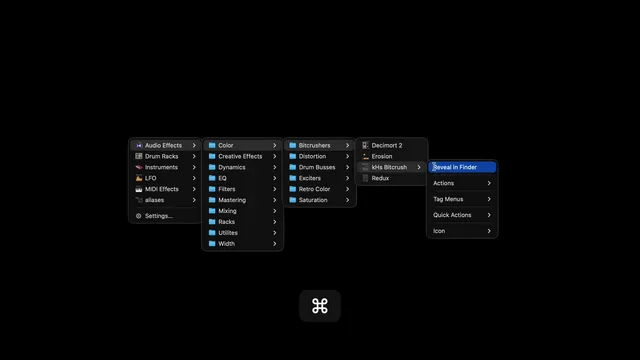
Turn any folder of files, templates, or scripts into a menu you can pop up anywhere on your Mac.
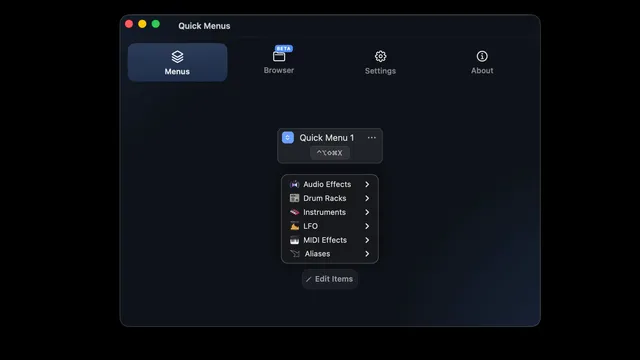
Assign a global keyboard shortcut to any menu — no mouse hunting, no Finder windows, just instant access.
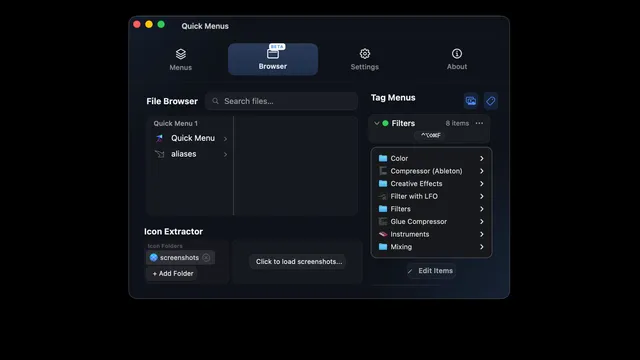
Point Quick Menus at any folder — documents, scripts, or project templates — and it becomes a menu instantly.
Free for 14 days — no credit card required.
$29 one-time purchase
Launch price. Going to $49.
Not happy with Quick Menus? Email support@quickmenus.app within 14 days of purchase for a full refund — no questions asked.
Quick Menus requires macOS 15.5+ and runs natively on Apple Silicon & Intel.
Free for 14 days — no credit card required. If you decide to buy, your license activates instantly — no reinstall needed.
Each license activates on up to 3 Macs. Need more? Email support@quickmenus.app.
No — Quick Menus is a one-time purchase with free updates, not a subscription. Your license key arrives by email from Gumroad right after checkout.